[求助] TH1520运行Gemma 4太慢,找CS高手看看内存带宽,请看最后一贴

用GCC 16.1.0编译llama.cpp b9264,开启了向量指令集,设置了流水线优化,开启LTO,编译过程如下,我用fish

cd /mnt/nas/llama.cpp/build
rm -rf *

set -gx CC /opt/gcc-16.1.0/bin/gcc
set -gx CXX /opt/gcc-16.1.0/bin/g++
set -gx M_ARCH "rv64imafdc_zicntr_zicsr_zifencei_zihpm_zfh_xtheadba_xtheadbb_xtheadbs_xtheadcmo_xtheadcondmov_xtheadfmemidx_xtheadmac_xtheadmemidx_xtheadmempair_xtheadsync_xtheadvector"
set -gx CFLAGS "-O3 -mcpu=xt-c910 -march=$M_ARCH -falign-loops=64 -falign-functions=64 -falign-jumps=64 \
--param l1-cache-size=64 --param l1-cache-line-size=64 --param simultaneous-prefetches=4 \
-funroll-loops -fvariable-expansion-in-unroller"
set -gx CXXFLAGS "-O3 -mcpu=xt-c910 -march=$M_ARCH -falign-loops=64 -falign-functions=64 -falign-jumps=64 \
--param l1-cache-size=64 --param l1-cache-line-size=64 --param simultaneous-prefetches=4 \
-funroll-loops -fvariable-expansion-in-unroller"
set -gx LDFLAGS "-L/opt/gcc-16.1.0/lib -L/opt/gcc-16.1.0/lib64 -Wl,-rpath=/opt/gcc-16.1.0/lib:/opt/gcc-16.1.0/lib64"
set -gx LIBRARY_PATH /opt/gcc-16.1.0/lib /opt/gcc-16.1.0/lib64 $LIBRARY_PATH
set -gx LD_LIBRARY_PATH /opt/gcc-16.1.0/lib /opt/gcc-16.1.0/lib64 $LD_LIBRARY_PATH
set -gx LDFLAGS "-L/opt/gcc-16.1.0/lib -L/opt/gcc-16.1.0/lib64 -Wl,-rpath=/opt/gcc-16.1.0/lib:/opt/gcc-16.1.0/lib64"

cmake .. \
  -DCMAKE_BUILD_TYPE=Release \
  -DLLAMA_BUILD_TESTS=OFF \
  -DGGML_OPENMP=ON \
  -DOpenMP_C_FLAGS="-fopenmp" \
  -DOpenMP_CXX_FLAGS="-fopenmp" \
  -DOpenMP_C_LIB_NAMES="gomp" \
  -DOpenMP_CXX_LIB_NAMES="gomp" \
  -DOpenMP_gomp_LIBRARY="/opt/gcc-16.1.0/lib/libgomp.so" \
  -DGGML_RVV=OFF \
  -DGGML_XTHEADVECTOR=ON \
  -DGGML_LTO=ON

# 手工添加webui文件
cp -r /mnt/nas/dist tools/ui/

# 禁止Vector 1.0代码,几年前的小破烂没这功能
sed -i 's/__riscv_v_intrinsic/__riscv_v/g' ../ggml/src/ggml-cpu/arch/riscv/quants.c

cmake --build . --config Release -j4

编译好的程序确实支持xtheadvector

debian@revyos-lpi4a /m/n/llama.app-b9264-lto-shared> readelf -A libggml-cpu.so.0.12.0
Attribute Section: riscv
File Attributes
  Tag_RISCV_stack_align: 16-bytes
  Tag_RISCV_arch: "rv64i2p1_m2p0_a2p1_f2p2_d2p2_c2p0_zicntr2p0_zicsr2p0_zifencei2p0_zihpm2p0_zmmul1p0_zaamo1p0_zalrsc1p0_zfh1p0_zfhmin1p0_zca1p0_zcd1p0_xtheadba1p0_xtheadbb1p0_xtheadbs1p0_xtheadcmo1p0_xtheadcondmov1p0_xtheadfmemidx1p0_xtheadmac1p0_xtheadmemidx1p0_xtheadmempair1p0_xtheadsync1p0_xtheadvector1p0"
  Tag_RISCV_unaligned_access: Unaligned access
  Tag_RISCV_priv_spec: 1
  Tag_RISCV_priv_spec_minor: 11

debian@revyos-lpi4a /m/n/llama.app-b9264-lto-shared> objdump -d libggml-cpu.so | grep -E "th\.v|vset" | head -n 30
    c94c:       000077d7                th.vsetvli      a5,zero,e8,m1,d1
    c952:       03067107                th.vleff.v      v2,(a2)
    c958:       0306f087                th.vleff.v      v1,(a3)
    c95c:       662081d7                th.vmsne.vv     v3,v2,v1
    c960:       62203057                th.vmseq.vi     v0,v2,0
    c964:       c2002773                csrr    a4,th.vl
    c968:       6a01a257                th.vmor.mm      v4,v0,v3
    c96c:       56402557                th.vmfirst.m    a0,v4
    c99c:       000077d7                th.vsetvli      a5,zero,e8,m1,d1
    c9a2:       0308f287                th.vleff.v      v5,(a7)
    c9a8:       030e7307                th.vleff.v      v6,(t3)
    c9ac:       665303d7                th.vmsne.vv     v7,v5,v6
    c9b0:       62503457                th.vmseq.vi     v8,v5,0
    c9b4:       c2002ef3                csrr    t4,th.vl
    c9b8:       6a83a4d7                th.vmor.mm      v9,v8,v7
    c9bc:       56902f57                th.vmfirst.m    t5,v9
    c9ec:       000077d7                th.vsetvli      a5,zero,e8,m1,d1
    c9f2:       0302f507                th.vleff.v      v10,(t0)
    c9f8:       03037587                th.vleff.v      v11,(t1)
    c9fc:       66a58657                th.vmsne.vv     v12,v10,v11
    ca00:       62a036d7                th.vmseq.vi     v13,v10,0
    ca04:       c20023f3                csrr    t2,th.vl
    ca08:       6ad62757                th.vmor.mm      v14,v13,v12
    ca0c:       56e02557                th.vmfirst.m    a0,v14
    ca3c:       000077d7                th.vsetvli      a5,zero,e8,m1,d1
    ca42:       030f7787                th.vleff.v      v15,(t5)
    ca48:       030ff807                th.vleff.v      v16,(t6)
    ca4c:       66f808d7                th.vmsne.vv     v17,v15,v16
    ca50:       62f03957                th.vmseq.vi     v18,v15,0
    ca54:       c20026f3                csrr    a3,th.vl

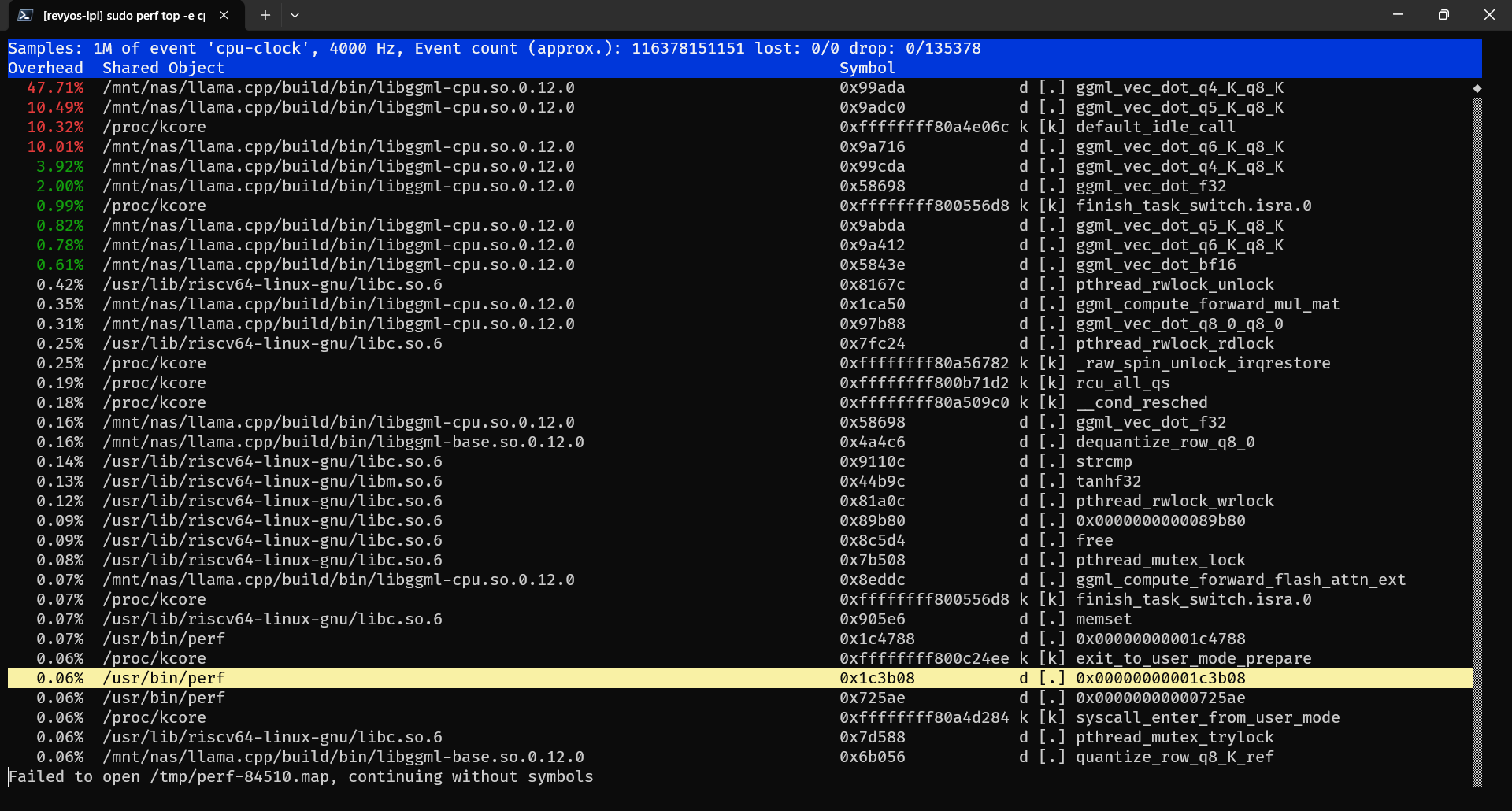
运行谷歌的芝麻4 E4B,使用3个核心的速度是0.4t/s,使用4核速度0.5t/s

debian@revyos-lpi4a /m/n/llama.app-b9264-lto-shared> ./llama-cli \
                                                           -m /mnt/nas/gemma-4-E4B-it-Q4_0.gguf \
                                                           -t 3 \
                                                           -tb 3 \
                                                           -ctk q8_0 \
                                                           -ctv q8_0 \
                                                           --no-mmap \
                                                           --min-p 0.0

Loading model...


▄▄ ▄▄
██ ██
██ ██  ▀▀█▄ ███▄███▄  ▀▀█▄    ▄████ ████▄ ████▄
██ ██ ▄█▀██ ██ ██ ██ ▄█▀██    ██    ██ ██ ██ ██
██ ██ ▀█▄██ ██ ██ ██ ▀█▄██ ██ ▀████ ████▀ ████▀
                                    ██    ██
                                    ▀▀    ▀▀

build      : b9274-52fb93a2b
model      : gemma-4-E4B-it-Q4_0.gguf
modalities : text

available commands:
  /exit or Ctrl+C     stop or exit
  /regen              regenerate the last response
  /clear              clear the chat history
  /read <file>        add a text file
  /glob <pattern>     add text files using globbing pattern


> 你现在运行在TH1520上,16GB内存,反应缓慢,什么原因?

[Start thinking]
Here's a thinking process to construct the answer:

1.  **Analyze the Request:** The user is presenting a scenario: "I am running on TH1520, 16GB RAM, and the reaction/response is slow. Why?"
    *   *Context:* The user is likely referring to a server, computing environment, or specific piece of hardware/software (TH1520).
    *   *Problem:* Slowness/slow reaction time.
    *   *Constraints provided:* TH1520 (likely the hardware model/architecture), 16GB RAM.

2.  **Identify the Core Problem (Symptom):** Slowness.

3.  **Determine Possible Causes (The "Why"):** Since I am an AI model and cannot directly access the hardware/software configuration, I must provide a comprehensive list of *potential* technical bottlenecks.

    *   *Hardware Constraints (TH15

[ Prompt: 0.6 t/s | Generation: 0.4 t/s ]

> 继续吧

[Start thinking]
Here's a thinking process that leads to the suggested response:

1.  **Analyze the Request:** The user is asking for potential reasons why a system running on a specific setup (TH1520, 16GB RAM) would be experiencing slow performance ("反应缓慢"). The implied context is a computing environment where the AI (or a running process) is operating.

2.  **Identify the Key Components & Constraints:**
    *   **System:** TH1520 (This is likely a specific type of embedded system, single-board computer, or proprietary server/device. Its performance characteristics are crucial but unknown.)
    *   **Memory:** 16GB RAM (This is generally sufficient for many tasks, but not necessarily for heavy AI/computation.)
    *   **Symptom:** Slow responsiveness ("反应缓慢").
    *   **Goal:** Provide a comprehensive list of possible causes.

3.  **Categorize Potential Bottlenecks (The 4 Pillars of Performance):**

    *   **A. Hardware Limitations (The Physical Machine):**
        *   CPU Speed/Type (Is the TH1520 processor powerful enough?)
        *   Storage I/O (Is it using slow HDD, or is the SSD bottlenecked?)
        *   Network Latency (If the task involves external communication.)
        *   Thermals (Is it overheating? This causes throttling.)
    *   **B. Software/OS Issues (The Environment):**
        *   Operating System Overhead (Too many background processes, resource leaks.)
        *   Drivers (Are the drivers outdated or incompatible?)
        *   Resource Allocation (Is the application poorly optimized? Is it fighting with other processes?)

1更:

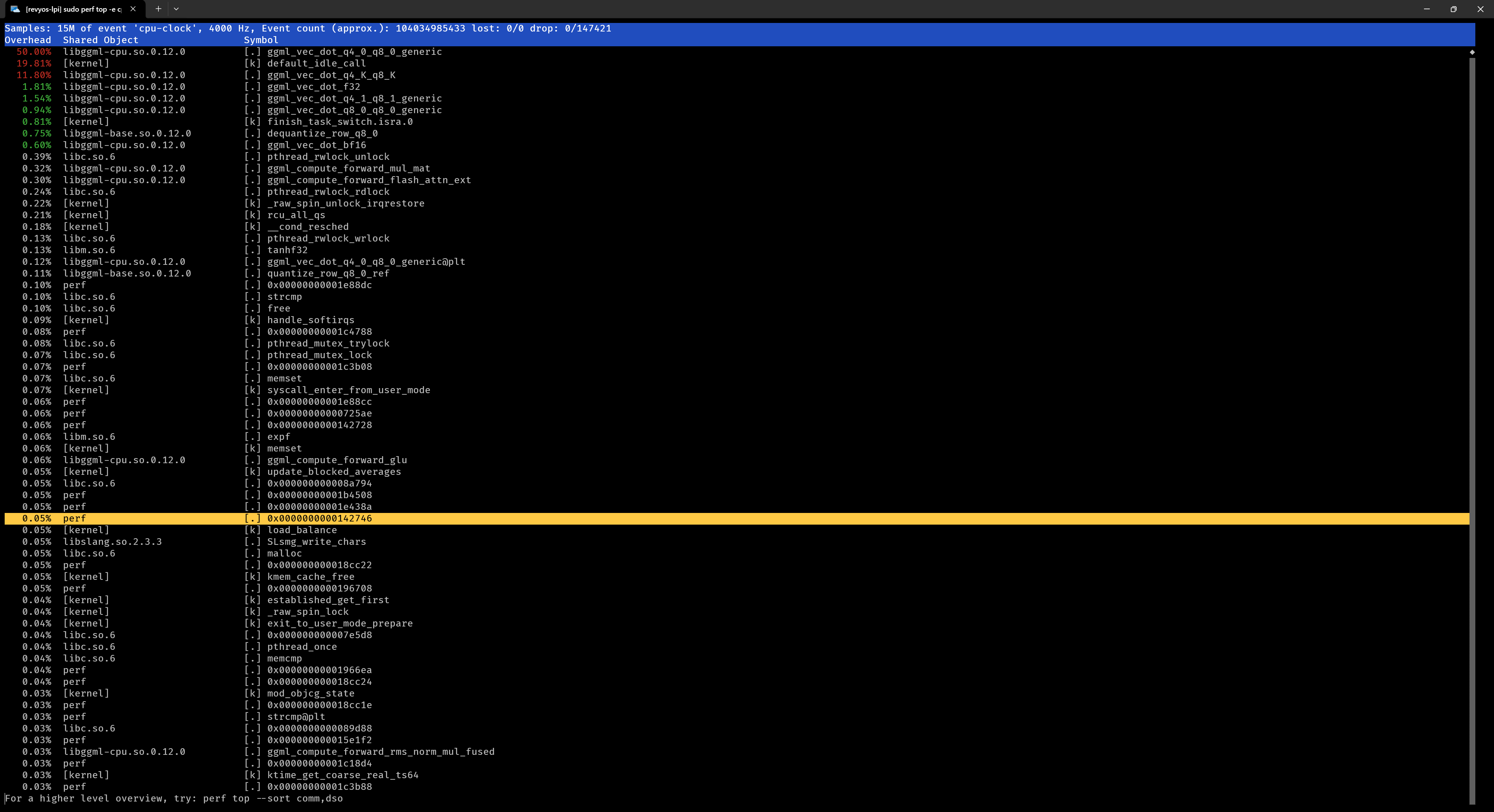
这是3核心的perf采样,ggml_vec_dot_q4_0_q8_0_generic 这个函数占了50%时间,它是标量指令函数
用AI写段脚本判断

#!/bin/bash
# ==================================================================
# Lichee Pi 4A (TH1520) - llama.cpp 向量算子真假硬核检测工具
# ==================================================================

# 默认检测当前目录下的库,也可以通过参数指定路径
SO_FILE=${1:-"libggml-cpu.so"}

if [ ! -f "$SO_FILE" ]; then
    echo "❌ 错误: 找不到目标动态库文件: $SO_FILE"
    echo "用法: bash check_vector.sh [path/to/libggml-cpu.so]"
    exit 1
fi

echo "=================================================================="
echo " 🔍 正在深度解剖: $SO_FILE"
echo " 🔀 扫描目标: 所有全局导出的矩阵点积算子 (ggml_vec_dot_*)"
echo "=================================================================="
printf "%-38s | %-12s | %s\n" "核心算子函数名" "起始物理地址" "核心硬件执行状态"
echo "------------------------------------------------------------------"

# 1. 用 nm 捞出所有非 generic 结尾的全局定义函数
nm -D --defined-only "$SO_FILE" | grep "ggml_vec_dot_" | while read -r addr type name; do
    
    start_addr="0x$addr"
    # 2. 静态切片 256 字节(十六进制 0x100),足以容纳函数头部的初始化和核心循环
    stop_addr=$(printf "0x%x" $((16#$addr + 256)))
    
    # 3. 强行拉出该函数肉身的反汇编代码
    asm_clip=$(objdump -d --start-address=$start_addr --stop-address=$stop_addr "$SO_FILE" 2>/dev/null)
    
    # 4. 正则硬核过筛特征码:
    #    - th.v : 平头哥专属特有向量前缀
    #    - vset : 标准 RVV 的 vsetvli / vsetivli 矢量长度设置
    #    - \s+v[0-9]+ : 汇编指令中出现了 v0 ~ v31 向量寄存器
    if echo "$asm_clip" | grep -E -q "th\.v|vset|\s+v[0-9]+"; then
        status="\033[32m🟢 真向量 (满血压榨硬件加速)\033[0m"
    else
        # 5. 如果没有向量指令,进一步抓取它是不是一个直接 Jump 扔给 generic 的桩函数
        if echo "$asm_clip" | grep -q -E "j[[:space:]]+.*generic"; then
            status="\033[31m🔴 假把戏 (桩函数·直通标量地狱)\033[0m"
        else
            status="\033[33m🟡 纯标量 (无内耗·但无向量加速)\033[0m"
        fi
    fi
    
    printf "%-38s | %-12s | b%b\n" "$name" "$start_addr" "$status"
done

echo "=================================================================="
==================================================================
 🔍 正在深度解剖: libggml-cpu.so
 🔀 扫描目标: 所有全局导出的矩阵点积算子 (ggml_vec_dot_*)
==================================================================
核心算子函数名                           | 起始物理地址         | 核心硬件执行状态
------------------------------------------------------------------
ggml_vec_dot_bf16                      | 0x00000000000583c0 | b🟡 纯标量 (无内耗·但无向量加速)
ggml_vec_dot_f16                       | 0x0000000000058580 | b🟡 纯标量 (无内耗·但无向量加速)
ggml_vec_dot_f32                       | 0x0000000000058700 | b🟢 真向量 (满血压榨硬件加速)
ggml_vec_dot_iq1_m_q8_K                | 0x00000000000a6cc0 | b🔴 假把戏 (桩函数·直通标量地狱)
ggml_vec_dot_iq1_m_q8_K_generic        | 0x000000000003e740 | b🟡 纯标量 (无内耗·但无向量加速)
ggml_vec_dot_iq1_s_q8_K                | 0x00000000000a6c80 | b🔴 假把戏 (桩函数·直通标量地狱)
ggml_vec_dot_iq1_s_q8_K_generic        | 0x000000000003e300 | b🟡 纯标量 (无内耗·但无向量加速)
ggml_vec_dot_iq2_s_q8_K                | 0x00000000000a6d00 | b🔴 假把戏 (桩函数·直通标量地狱)
ggml_vec_dot_iq2_s_q8_K_generic        | 0x000000000003d700 | b🟡 纯标量 (无内耗·但无向量加速)
ggml_vec_dot_iq2_xs_q8_K               | 0x00000000000a6d40 | b🔴 假把戏 (桩函数·直通标量地狱)
ggml_vec_dot_iq2_xs_q8_K_generic       | 0x000000000003d140 | b🟡 纯标量 (无内耗·但无向量加速)
ggml_vec_dot_iq2_xxs_q8_K              | 0x00000000000a6d80 | b🔴 假把戏 (桩函数·直通标量地狱)
ggml_vec_dot_iq2_xxs_q8_K_generic      | 0x000000000003cec0 | b🟡 纯标量 (无内耗·但无向量加速)
ggml_vec_dot_iq3_s_q8_K                | 0x00000000000a6dc0 | b🔴 假把戏 (桩函数·直通标量地狱)
ggml_vec_dot_iq3_s_q8_K_generic        | 0x000000000003df00 | b🟡 纯标量 (无内耗·但无向量加速)
ggml_vec_dot_iq3_xxs_q8_K              | 0x00000000000a6e00 | b🔴 假把戏 (桩函数·直通标量地狱)
ggml_vec_dot_iq3_xxs_q8_K_generic      | 0x000000000003dcc0 | b🟡 纯标量 (无内耗·但无向量加速)
ggml_vec_dot_iq4_nl_q8_0               | 0x00000000000a6e40 | b🔴 假把戏 (桩函数·直通标量地狱)
ggml_vec_dot_iq4_nl_q8_0_generic       | 0x000000000003ed00 | b🟡 纯标量 (无内耗·但无向量加速)
ggml_vec_dot_iq4_xs_q8_K               | 0x00000000000a6e80 | b🔴 假把戏 (桩函数·直通标量地狱)
ggml_vec_dot_iq4_xs_q8_K_generic       | 0x000000000003f0c0 | b🟡 纯标量 (无内耗·但无向量加速)
ggml_vec_dot_mxfp4_q8_0                | 0x00000000000a6f40 | b🔴 假把戏 (桩函数·直通标量地狱)
ggml_vec_dot_mxfp4_q8_0_generic        | 0x0000000000038c80 | b🔴 假把戏 (桩函数·直通标量地狱)
ggml_vec_dot_nvfp4_q8_0                | 0x0000000000037e40 | b🟡 纯标量 (无内耗·但无向量加速)
ggml_vec_dot_q1_0_q8_0                 | 0x00000000000a6c00 | b🔴 假把戏 (桩函数·直通标量地狱)
ggml_vec_dot_q1_0_q8_0_generic         | 0x0000000000038300 | b🟡 纯标量 (无内耗·但无向量加速)
ggml_vec_dot_q2_K_q8_K                 | 0x0000000000096e80 | b🟢 真向量 (满血压榨硬件加速)
ggml_vec_dot_q2_K_q8_K_generic         | 0x000000000003a480 | b🟡 纯标量 (无内耗·但无向量加速)
ggml_vec_dot_q3_K_q8_K                 | 0x00000000000975c0 | b🟢 真向量 (满血压榨硬件加速)
ggml_vec_dot_q3_K_q8_K_generic         | 0x000000000003aa00 | b🟡 纯标量 (无内耗·但无向量加速)
ggml_vec_dot_q4_0_q8_0                 | 0x00000000000a6ac0 | b🔴 假把戏 (桩函数·直通标量地狱)
ggml_vec_dot_q4_0_q8_0_generic         | 0x0000000000038640 | b🟡 纯标量 (无内耗·但无向量加速)
ggml_vec_dot_q4_1_q8_1                 | 0x00000000000a6b00 | b🔴 假把戏 (桩函数·直通标量地狱)
ggml_vec_dot_q4_1_q8_1_generic         | 0x0000000000038980 | b🟡 纯标量 (无内耗·但无向量加速)
ggml_vec_dot_q4_K_q8_K                 | 0x0000000000098840 | b🟢 真向量 (满血压榨硬件加速)
ggml_vec_dot_q4_K_q8_K_generic         | 0x000000000003b740 | b🟡 纯标量 (无内耗·但无向量加速)
ggml_vec_dot_q5_0_q8_0                 | 0x00000000000a6b40 | b🔴 假把戏 (桩函数·直通标量地狱)
ggml_vec_dot_q5_0_q8_0_generic         | 0x0000000000039080 | b🟡 纯标量 (无内耗·但无向量加速)
ggml_vec_dot_q5_1_q8_1                 | 0x00000000000a6b80 | b🔴 假把戏 (桩函数·直通标量地狱)
ggml_vec_dot_q5_1_q8_1_generic         | 0x0000000000039580 | b🟡 纯标量 (无内耗·但无向量加速)
ggml_vec_dot_q5_K_q8_K                 | 0x00000000000a6c40 | b🔴 假把戏 (桩函数·直通标量地狱)
ggml_vec_dot_q5_K_q8_K_generic         | 0x000000000003bf40 | b🟡 纯标量 (无内耗·但无向量加速)
ggml_vec_dot_q6_K_q8_K                 | 0x0000000000098f80 | b🟢 真向量 (满血压榨硬件加速)
ggml_vec_dot_q6_K_q8_K_generic         | 0x000000000003c9c0 | b🟡 纯标量 (无内耗·但无向量加速)
ggml_vec_dot_q8_0_q8_0                 | 0x00000000000a6bc0 | b🔴 假把戏 (桩函数·直通标量地狱)
ggml_vec_dot_q8_0_q8_0_generic         | 0x0000000000039a40 | b🟡 纯标量 (无内耗·但无向量加速)
ggml_vec_dot_tq1_0_q8_K                | 0x00000000000a6ec0 | b🔴 假把戏 (桩函数·直通标量地狱)
ggml_vec_dot_tq1_0_q8_K_generic        | 0x0000000000039b80 | b🟡 纯标量 (无内耗·但无向量加速)
ggml_vec_dot_tq2_0_q8_K                | 0x00000000000a6f00 | b🔴 假把戏 (桩函数·直通标量地狱)
ggml_vec_dot_tq2_0_q8_K_generic        | 0x000000000003a2c0 | b🟡 纯标量 (无内耗·但无向量加速)

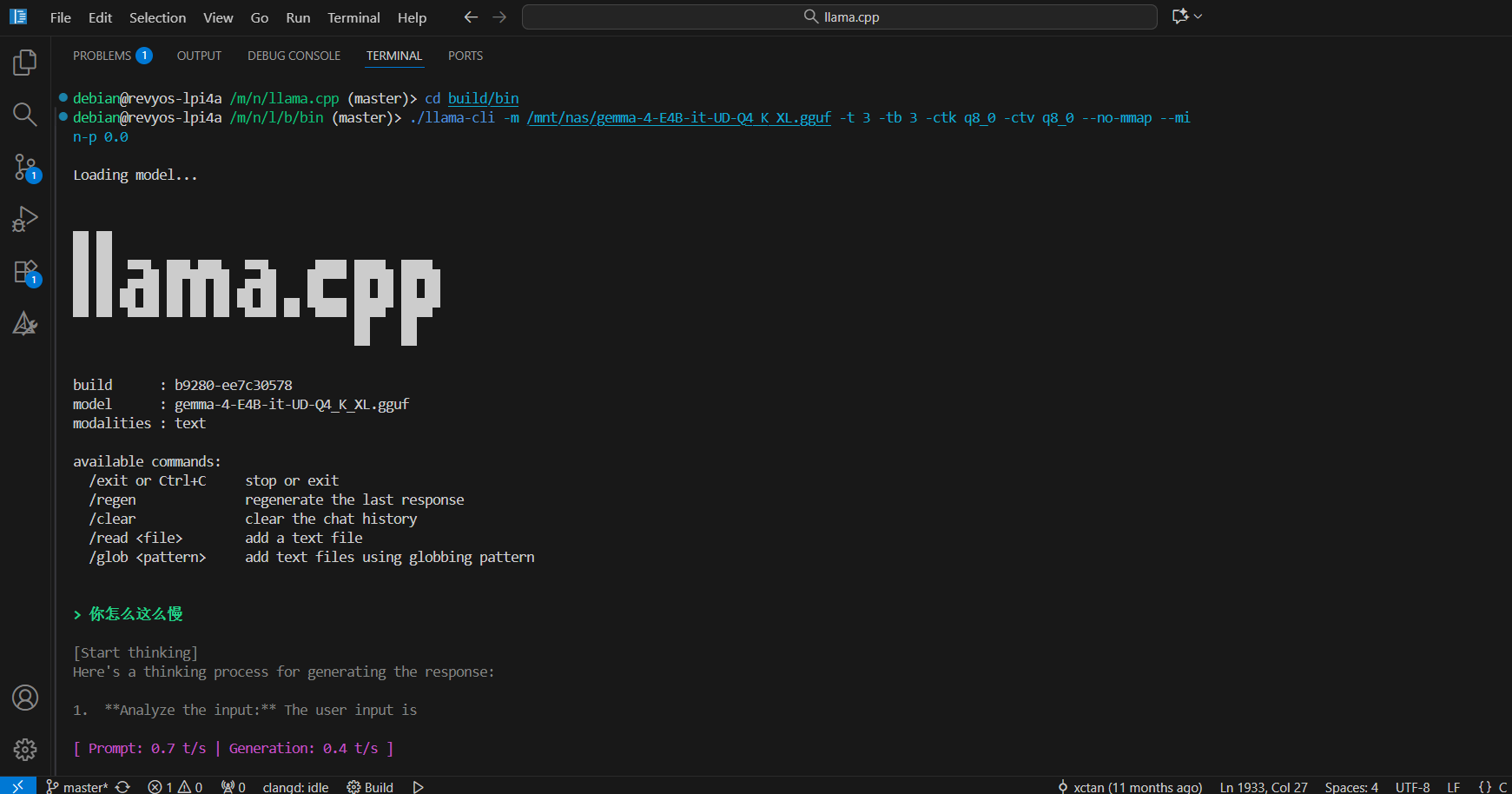
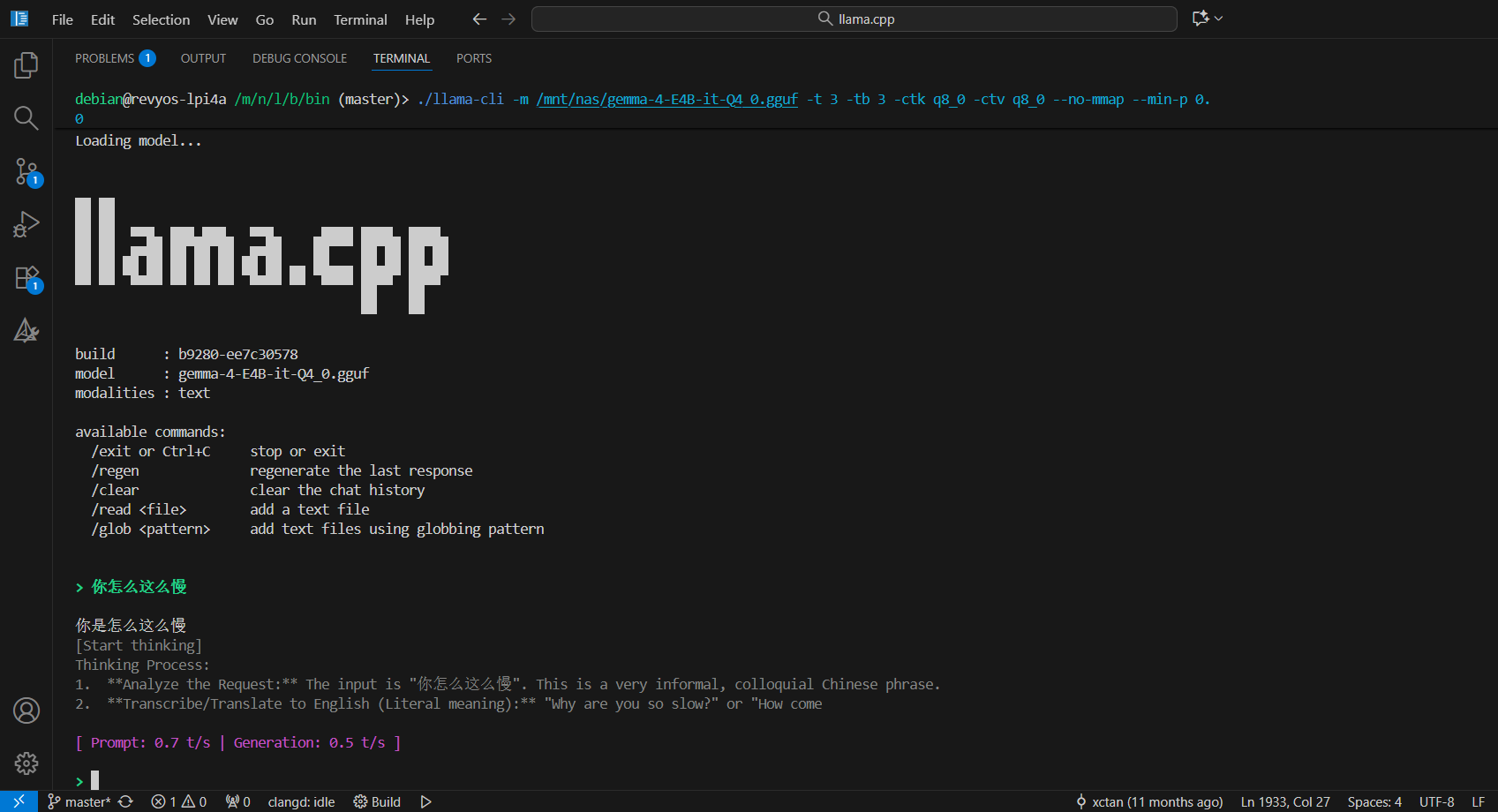
测试多个芝麻量化后的模型后得到结论:Q4_0因为结构简单,只用标量函数计算,速度就可以打平向量计算的Q4_K_M,Q4_K_M结构更复杂,数据量大。这两种格式的同规模模型速度都是0.4t/s。对于Q4_K_S和UD-Q4_K_XL,它们含有Q5_K参数,Q5_K没有向量函数,速度降低到0.3t/s。

2更:

翻了一下llama.cpp代码,向量函数检查结果和宏定义__riscv_xtheadvector(由编译参数GGML_XTHEADVECTOR控制)一致,llama.cpp现在对向量的支持比较简陋,开向量指令也就图一乐,不想自己写代码就得换其他推理软件试试
1 个赞
void ggml_vec_dot_q4_0_q8_0(int n, float * GGML_RESTRICT s, size_t bs, const void * GGML_RESTRICT vx, size_t bx, const void * GGML_RESTRICT vy, size_t by, int nrc) {
#if defined(__riscv_xtheadvector)
    const int qk = QK8_0; const int nb = n / qk;
    assert(n % qk == 0); assert(nrc == 1);
    UNUSED(nrc); UNUSED(bx); UNUSED(by); UNUSED(bs);

    const block_q4_0 * GGML_RESTRICT x = vx;
    const block_q8_0 * GGML_RESTRICT y = vy;
    float sumf = 0; size_t vl = qk / 2; 

    for (int ib = 0; ib < nb; ++ib) {
        const uint8_t * qx = x[ib].qs;
        const int8_t  * qy0 = y[ib].qs;
        const int8_t  * qy1 = y[ib].qs + 16;
        const float d = GGML_CPU_FP16_TO_FP32(x[ib].d) * GGML_CPU_FP16_TO_FP32(y[ib].d);
        int sumi, tmp; int s_zero = 0;
        
        __asm__ __volatile__(
            "th.vsetvli zero, %[vl], e8, m1\n\t"
            "th.vlb.v v0, (%[qx])\n\t"
            "th.vlb.v v2, (%[qy0])\n\t"
            "th.vlb.v v4, (%[qy1])\n\t"
            
            "th.vand.vi v6, v0, 0x0F\n\t"
            "th.vsrl.vi v8, v0, 4\n\t"
            
            "li %[tmp], 8\n\t"
            "th.vsub.vx v6, v6, %[tmp]\n\t"
            "th.vsub.vx v8, v8, %[tmp]\n\t"
            
            "th.vwmul.vv v12, v6, v2\n\t"        // v12 此时是 e16, m2
            "th.vwmacc.vv v12, v8, v4\n\t"       
            
            "th.vsetvli zero, %[vl], e16, m2\n\t" 
            "th.vwadd.vx v16, v12, %[sz]\n\t"     // e16,m2 -> e32,m4 (v16~v19)
            
            "th.vsetvli zero, zero, e32, m1\n\t"
            "th.vmv.v.x v20, zero\n\t"           
            
            "th.vsetvli zero, %[vl], e32, m4\n\t" 
            "th.vredsum.vs v20, v16, v20\n\t"    
            "th.vmv.x.s %[sumi], v20\n\t"
            
            : [sumi] "=&r" (sumi), [tmp] "=&r" (tmp)
            : [qx] "r" (qx), [qy0] "r" (qy0), [qy1] "r" (qy1), [vl] "r" (vl), [sz] "r" (s_zero)
            : "memory", "v0", "v1", "v2", "v3", "v4", "v5", "v6", "v7", 
              "v8", "v9", "v12", "v13", "v16", "v17", "v18", "v19", "v20"
        );
        sumf += sumi * d;
    }
    *s = sumf;
#elif defined(__riscv_v)
    const int qk = QK8_0;
    const int nb = n / qk;

    assert(n % qk == 0);
    assert(nrc == 1);
    UNUSED(nrc);
    UNUSED(bx);
    UNUSED(by);
    UNUSED(bs);

    const block_q4_0 * GGML_RESTRICT x = vx;
    const block_q8_0 * GGML_RESTRICT y = vy;

    int ib = 0;
    float sumf = 0;

    size_t vl = qk / 2;

    for (; ib < nb; ++ib) {
        // load elements
        vuint8m1_t tx = __riscv_vle8_v_u8m1(x[ib].qs, vl);

        vint8m1_t y0 = __riscv_vle8_v_i8m1(y[ib].qs, vl);
        vint8m1_t y1 = __riscv_vle8_v_i8m1(y[ib].qs+16, vl);

        // mask and store lower part of x, and then upper part
        vuint8m1_t x_a = __riscv_vand_vx_u8m1(tx, 0x0F, vl);
        vuint8m1_t x_l = __riscv_vsrl_vx_u8m1(tx, 0x04, vl);

        vint8m1_t x_ai = __riscv_vreinterpret_v_u8m1_i8m1(x_a);
        vint8m1_t x_li = __riscv_vreinterpret_v_u8m1_i8m1(x_l);

        // subtract offset
        vint8m1_t v0 = __riscv_vsub_vx_i8m1(x_ai, 8, vl);
        vint8m1_t v1 = __riscv_vsub_vx_i8m1(x_li, 8, vl);

        vint16m2_t vec_mul1 = __riscv_vwmul_vv_i16m2(v0, y0, vl);
        vint16m2_t vec_mul2 = __riscv_vwmacc_vv_i16m2(vec_mul1, v1, y1, vl);

        vint32m1_t vec_zero = __riscv_vmv_v_x_i32m1(0, vl);
        vint32m1_t vs2 = __riscv_vwredsum_vs_i16m2_i32m1(vec_mul2, vec_zero, vl);

        int sumi = __riscv_vmv_x_s_i32m1_i32(vs2);

        sumf += sumi*GGML_CPU_FP16_TO_FP32(x[ib].d)*GGML_CPU_FP16_TO_FP32(y[ib].d);
    }

    *s = sumf;
#else
    ggml_vec_dot_q4_0_q8_0_generic(n, s, bs, vx, bx, vy, by, nrc);
#endif
}
void ggml_vec_dot_q4_1_q8_1(int n, float * GGML_RESTRICT s, size_t bs, const void * GGML_RESTRICT vx, size_t bx, const void * GGML_RESTRICT vy, size_t by, int nrc) {
#if defined(__riscv_xtheadvector)
    const int qk = QK8_1;
    const int nb = n / qk;

    assert(n % qk == 0);
    assert(nrc == 1);
    UNUSED(nrc);
    UNUSED(bx);
    UNUSED(by);
    UNUSED(bs);

    const block_q4_1 * GGML_RESTRICT x = vx;
    const block_q8_1 * GGML_RESTRICT y = vy;

    float sumf = 0;
    size_t vl = qk / 2;

    for (int ib = 0; ib < nb; ++ib) {
        const uint8_t * qx = x[ib].qs;
        const int8_t  * qy0 = y[ib].qs;
        const int8_t  * qy1 = y[ib].qs + 16;
        
        const float dx = GGML_CPU_FP16_TO_FP32(x[ib].d);
        const float dy = GGML_CPU_FP16_TO_FP32(y[ib].d);
        const float mx = GGML_CPU_FP16_TO_FP32(x[ib].m);
        const float sy = GGML_CPU_FP16_TO_FP32(y[ib].s);
        int sumi;

        __asm__ __volatile__(
            "th.vsetvli zero, %[vl], e8, m1\n\t"
            
            "th.vlb.v v0, (%[qx])\n\t"
            "th.vlb.v v2, (%[qy0])\n\t"
            "th.vlb.v v4, (%[qy1])\n\t"
            
            "th.vand.vi v6, v0, 0x0F\n\t"
            "th.vsrl.vi v8, v0, 4\n\t"
            
            "th.vwmul.vv v12, v6, v2\n\t"        
            "th.vwmacc.vv v12, v8, v4\n\t"       
            
            // 👑 显式安全拓宽:从 e16, m2 拓宽到 e32, m4
            "th.vwadd.vx v16, v12, zero\n\t"     
            
            // 运行常规归约
            "th.vsetvli zero, %[vl], e32, m4\n\t"
            "th.vmv.v.x v20, zero\n\t"           
            "th.vredsum.vs v20, v16, v20\n\t"    
            
            "th.vmv.x.s %[sumi], v20\n\t"
            
            : [sumi] "=&r" (sumi)
            : [qx] "r" (qx), [qy0] "r" (qy0), [qy1] "r" (qy1), [vl] "r" (vl)
            : "memory", "v0", "v1", "v2", "v3", "v4", "v5", "v6", "v7", 
              "v8", "v9", "v12", "v13", "v16", "v17", "v18", "v19", "v20"
        );
        
        sumf += (dx * dy) * sumi + (mx * sy);
    }
    *s = sumf;
#elif defined(__riscv_v)
    const int qk = QK8_1;
    const int nb = n / qk;

    assert(n % qk == 0);
    assert(nrc == 1);
    UNUSED(nrc);
    UNUSED(bx);
    UNUSED(by);
    UNUSED(bs);

    const block_q4_1 * GGML_RESTRICT x = vx;
    const block_q8_1 * GGML_RESTRICT y = vy;

    int ib = 0;
    float sumf = 0;

    size_t vl = qk / 2;

    for (; ib < nb; ++ib) {
        // load elements
        vuint8m1_t tx = __riscv_vle8_v_u8m1(x[ib].qs, vl);

        vint8m1_t y0 = __riscv_vle8_v_i8m1(y[ib].qs, vl);
        vint8m1_t y1 = __riscv_vle8_v_i8m1(y[ib].qs+16, vl);

        // mask and store lower part of x, and then upper part
        vuint8m1_t x_a = __riscv_vand_vx_u8m1(tx, 0x0F, vl);
        vuint8m1_t x_l = __riscv_vsrl_vx_u8m1(tx, 0x04, vl);

        vint8m1_t v0 = __riscv_vreinterpret_v_u8m1_i8m1(x_a);
        vint8m1_t v1 = __riscv_vreinterpret_v_u8m1_i8m1(x_l);

        vint16m2_t vec_mul1 = __riscv_vwmul_vv_i16m2(v0, y0, vl);
        vint16m2_t vec_mul2 = __riscv_vwmacc_vv_i16m2(vec_mul1, v1, y1, vl);

        vint32m1_t vec_zero = __riscv_vmv_v_x_i32m1(0, vl);
        vint32m1_t vs2 = __riscv_vwredsum_vs_i16m2_i32m1(vec_mul2, vec_zero, vl);

        int sumi = __riscv_vmv_x_s_i32m1_i32(vs2);

        sumf += (GGML_CPU_FP16_TO_FP32(x[ib].d)*GGML_CPU_FP16_TO_FP32(y[ib].d))*sumi + GGML_CPU_FP16_TO_FP32(x[ib].m)*GGML_CPU_FP16_TO_FP32(y[ib].s);
    }

    *s = sumf;
#else
    ggml_vec_dot_q4_1_q8_1_generic(n, s, bs, vx, bx, vy, by, nrc);
#endif
}
void ggml_vec_dot_q5_0_q8_0(int n, float * GGML_RESTRICT s, size_t bs, const void * GGML_RESTRICT vx, size_t bx, const void * GGML_RESTRICT vy, size_t by, int nrc) {
#if defined(__riscv_xtheadvector)
    const int qk = QK8_0; const int nb = n / qk;
    assert(n % qk == 0); assert(qk == QK5_0); assert(nrc == 1);
    UNUSED(nrc); UNUSED(bx); UNUSED(by); UNUSED(bs);

    const block_q5_0 * GGML_RESTRICT x = vx;
    const block_q8_0 * GGML_RESTRICT y = vy;
    float sumf = 0;

    for (int ib = 0; ib < nb; ++ib) {
        const uint8_t * qx = x[ib].qs;
        const uint8_t * qh = x[ib].qh;
        const int8_t  * qy = y[ib].qs;
        const float d = GGML_CPU_FP16_TO_FP32(x[ib].d) * GGML_CPU_FP16_TO_FP32(y[ib].d);
        int sumi, tmp; int s_zero = 0;

        __asm__ __volatile__(
            "th.vsetvli zero, %[vl16], e8, m1\n\t"
            "th.vlb.v v2, (%[qx])\n\t"
            
            "th.vand.vi v16, v2, 0x0F\n\t"
            "th.vsrl.vi v17, v2, 4\n\t"

            "lw %[tmp], 0(%[qh])\n\t"            
            "th.vsetvli zero, %[vl1], e32, m1\n\t" 
            "th.vmv.v.x v0, %[tmp]\n\t"          

            "th.vsetvli zero, %[vl32], e8, m2\n\t"
            "li %[tmp], 16\n\t"
            "th.vsub.vx v16, v16, %[tmp]\n\t"    
            
            "th.vmv.v.x v2, %[tmp]\n\t"          
            "th.vadd.vv v2, v16, v2\n\t"         
            "th.vmerge.vvm v16, v16, v2, v0\n\t" 

            "th.vlb.v v20, (%[qy])\n\t"
            "th.vwmul.vv v24, v16, v20\n\t"      // 乘法结果为 v24 (e16, m4)

            "th.vsetvli zero, %[vl32], e16, m4\n\t" 
            "th.vwadd.vx v8, v24, %[sz]\n\t"      // e16,m4 -> e32,m8 (v8~v15)
            
            "th.vsetvli zero, zero, e32, m1\n\t"
            "th.vmv.v.x v0, zero\n\t"               
            
            "th.vsetvli zero, %[vl32], e32, m8\n\t" 
            "th.vredsum.vs v0, v8, v0\n\t"       
            "th.vmv.x.s %[sumi], v0\n\t"        
            
            : [sumi] "=&r" (sumi), [tmp] "=&r" (tmp)
            : [qx] "r" (qx), [qh] "r" (qh), [qy] "r" (qy), [vl16] "r" (16), [vl32] "r" (32), [vl1] "r" (1), [sz] "r" (s_zero)
            : "memory", "v0", "v2", "v3", "v8", "v9", "v10", "v11", "v12", "v13", "v14", "v15",
              "v16", "v17", "v20", "v21", "v24", "v25", "v26", "v27"
        );
        sumf += sumi * d;
    }
    *s = sumf;
#elif defined(__riscv_v)
    const int qk = QK8_0;
    const int nb = n / qk;

    int ib = 0;
    float sumf = 0;

    assert(n % qk == 0);
    assert(qk == QK5_0);
    assert(nrc == 1);
    UNUSED(nrc);
    UNUSED(bx);
    UNUSED(by);
    UNUSED(bs);

    const block_q5_0 * GGML_RESTRICT x = vx;
    const block_q8_0 * GGML_RESTRICT y = vy;

    size_t vl;
    size_t vlenb = __riscv_vlenb();

    for (; ib < nb; ++ib) {
        vl = qk / 2;
        vuint8m1_t v0 = __riscv_vle8_v_u8m1(x[ib].qs, vl);
        vint8m1_t v0l = __riscv_vreinterpret_v_u8m1_i8m1(__riscv_vand_vx_u8m1(v0, 0x0F, vl));
        vint8m1_t v0h = __riscv_vreinterpret_v_u8m1_i8m1(__riscv_vsrl_vx_u8m1(v0, 4, vl));
        vint8m2_t v0c;
        if (vlenb == 16) {
            v0c = __riscv_vcreate_v_i8m1_i8m2(v0l, v0h);
        } else {
            v0l = __riscv_vslideup_vx_i8m1(v0l, v0h, 16, 32);
            v0c = __riscv_vlmul_ext_v_i8m1_i8m2(v0l);
        }

        vl = qk;
        vbool4_t qh = __riscv_vlm_v_b4(x[ib].qh, vl);
        qh = __riscv_vmnand_mm_b4(qh, qh, vl);
        vint8m2_t v0f = __riscv_vsub_vx_i8m2_mu(qh, v0c, v0c, 0x10, vl);
        vint8m2_t v1 = __riscv_vle8_v_i8m2(y[ib].qs, vl);
        vint16m4_t mul = __riscv_vwmul_vv_i16m4(v0f, v1, vl);
        vint32m1_t zero = __riscv_vmv_v_x_i32m1(0, vl);
        vint32m1_t sum = __riscv_vwredsum_vs_i16m4_i32m1(mul, zero, vl);
        int32_t sumi = __riscv_vmv_x_s_i32m1_i32(sum);

        sumf += (GGML_CPU_FP16_TO_FP32(x[ib].d) * GGML_CPU_FP16_TO_FP32(y[ib].d)) * sumi;
    }

    *s = sumf;
#else
    ggml_vec_dot_q5_0_q8_0_generic(n, s, bs, vx, bx, vy, by, nrc);
#endif
}
void ggml_vec_dot_q5_K_q8_K(int n, float * GGML_RESTRICT s, size_t bs, const void * GGML_RESTRICT vx, size_t bx, const void * GGML_RESTRICT vy,  size_t by, int nrc) {
    assert(n % QK_K == 0);
    assert(nrc == 1);
    UNUSED(nrc);
    UNUSED(bx);
    UNUSED(by);
    UNUSED(bs);

    const block_q5_K * GGML_RESTRICT x = vx;
    const block_q8_K * GGML_RESTRICT y = vy;

    const int nb = n / QK_K;

    static const uint32_t kmask1 = 0x3f3f3f3f;
    static const uint32_t kmask2 = 0x0f0f0f0f;
    static const uint32_t kmask3 = 0x03030303;

    uint32_t utmp[4];

#if defined __riscv_xtheadvector
    const uint8_t * scales = (const uint8_t*)&utmp[0];
    const uint8_t * mins   = (const uint8_t*)&utmp[2];

    float sumf = 0;
    float sums = 0.0;

    for (int i = 0; i < nb; ++i) {
        const uint8_t * GGML_RESTRICT q5 = x[i].qs;
        const uint8_t * GGML_RESTRICT hm = x[i].qh;
        const  int8_t * GGML_RESTRICT q8 = y[i].qs;

        const float d = GGML_CPU_FP16_TO_FP32(x[i].d) * y[i].d;
        const float dmin = GGML_CPU_FP16_TO_FP32(x[i].dmin) * y[i].d;

        memcpy(utmp, x[i].scales, 12);
        utmp[3] = ((utmp[2] >> 4) & kmask2) | (((utmp[1] >> 6) & kmask3) << 4);
        const uint32_t uaux = utmp[1] & kmask1;
        utmp[1] = (utmp[2] & kmask2) | (((utmp[0] >> 6) & kmask3) << 4);
        utmp[2] = uaux;
        utmp[0] &= kmask1;

        int32_t mins_sumi = 0;
        for (int k = 0; k < 8; ++k) {
            int32_t q8sum = (int32_t)y[i].bsums[k*2] + (int32_t)y[i].bsums[k*2+1];
            mins_sumi += q8sum * (int32_t)mins[k];
        }
        sumf -= dmin * mins_sumi;

        int32_t aux32 = 0;
        int is = 0;
        uint32_t m_mask = 1;

        for (int j = 0; j < QK_K/64; ++j) {
            int sc1 = scales[is++];
            int sc2 = scales[is++];
            int inner_sum;
            int tmp_reg;

            __asm__ __volatile__(
                "th.vsetvli zero, %[vl32], e8, m2\n\t"
                "th.vlb.v v14, (%[q5])\n\t"         
                "th.vlb.v v2, (%[qh])\n\t"          
                "th.vlb.v v4, (%[q8_1])\n\t"        
                "th.vlb.v v6, (%[q8_2])\n\t"        

                "th.vand.vi v8, v14, 0x0F\n\t"      
                "th.vand.vx v10, v2, %[m1]\n\t"     
                "th.vmsne.vx v0, v10, zero\n\t"     
                
                "li %[tmp], 16\n\t"
                "th.vmv.v.x v12, %[tmp]\n\t"        
                "th.vadd.vv v12, v8, v12\n\t"       
                "th.vmerge.vvm v8, v8, v12, v0\n\t" 

                "th.vsrl.vi v12, v14, 4\n\t"        
                "th.vand.vx v10, v2, %[m2]\n\t"     
                "th.vmsne.vx v0, v10, zero\n\t"     
                
                "th.vmv.v.x v10, %[tmp]\n\t"        
                "th.vadd.vv v10, v12, v10\n\t"      
                "th.vmerge.vvm v12, v12, v10, v0\n\t" 

                "th.vwmul.vv v16, v8, v4\n\t"
                "th.vwmul.vv v20, v12, v6\n\t"

                "th.vsetvli zero, %[vl32], e16, m4\n\t"
                "th.vwmul.vx v24, v16, %[sc1]\n\t"
                "th.vwmul.vx v8, v20, %[sc2]\n\t"

                "th.vsetvli zero, zero, e32, m1\n\t"
                "th.vmv.v.x v0, zero\n\t"           
                
                "th.vsetvli zero, %[vl32], e32, m8\n\t"
                "th.vredsum.vs v0, v24, v0\n\t"     
                "th.vredsum.vs v0, v8, v0\n\t"      
                "th.vmv.x.s %[inner_sum], v0\n\t"   
                "add %[aux], %[aux], %[inner_sum]"
                
                : [tmp] "=&r" (tmp_reg), [inner_sum] "=&r" (inner_sum), [aux] "+&r" (aux32)
                : [q5] "r" (q5), [qh] "r" (hm), [q8_1] "r" (q8), [q8_2] "r" (q8+32),
                  [m1] "r" (m_mask), [m2] "r" (m_mask << 1), [sc1] "r" (sc1), [sc2] "r" (sc2), [vl32] "r" (32)
                : "memory", "v0", "v1", "v2", "v3", "v4", "v5", "v6", "v7", "v8", "v9", "v10", "v11",
                  "v12", "v13", "v14", "v15", "v16", "v17", "v18", "v19", "v20", "v21", "v22", "v23",
                  "v24", "v25", "v26", "v27", "v28", "v29", "v30", "v31"
            );

            m_mask <<= 2; q5 += 32; q8 += 64;
        }
        sums += aux32 * d;
    }
    *s = sumf + sums;
#elif defined __riscv_v

    const uint8_t * scales = (const uint8_t*)&utmp[0];
    const uint8_t * mins   = (const uint8_t*)&utmp[2];

    float sumf = 0;
    float sums = 0.0;

    size_t vl;

    for (int i = 0; i < nb; ++i) {

        vl = 8;

        const uint8_t * GGML_RESTRICT q5 = x[i].qs;
        const uint8_t * GGML_RESTRICT hm = x[i].qh;
        const  int8_t * GGML_RESTRICT q8 = y[i].qs;

        const float d = GGML_CPU_FP16_TO_FP32(x[i].d) * y[i].d;
        const float dmin = GGML_CPU_FP16_TO_FP32(x[i].dmin) * y[i].d;

        vint16m1_t q8sums_0 = __riscv_vlse16_v_i16m1(y[i].bsums, 4, vl);
        vint16m1_t q8sums_1 = __riscv_vlse16_v_i16m1(y[i].bsums+1, 4, vl);
        vint16m1_t q8sums = __riscv_vadd_vv_i16m1(q8sums_0, q8sums_1, vl);

        memcpy(utmp, x[i].scales, 12);
        utmp[3] = ((utmp[2] >> 4) & kmask2) | (((utmp[1] >> 6) & kmask3) << 4);
        const uint32_t uaux = utmp[1] & kmask1;
        utmp[1] = (utmp[2] & kmask2) | (((utmp[0] >> 6) & kmask3) << 4);
        utmp[2] = uaux;
        utmp[0] &= kmask1;

        vuint8mf2_t mins8 = __riscv_vle8_v_u8mf2(mins, vl);
        vint16m1_t v_mins = __riscv_vreinterpret_v_u16m1_i16m1(__riscv_vzext_vf2_u16m1(mins8, vl));
        vint32m2_t prod = __riscv_vwmul_vv_i32m2(q8sums, v_mins, vl);

        vint32m1_t sumi = __riscv_vredsum_vs_i32m2_i32m1(prod, __riscv_vmv_v_x_i32m1(0, 1), vl);
        sumf -= dmin * __riscv_vmv_x_s_i32m1_i32(sumi);

        vl = 32;
        int32_t aux32 = 0;
        int is = 0;

        uint8_t m = 1;
        vint32m1_t vzero = __riscv_vmv_v_x_i32m1(0, 1);
        vuint8m2_t vqh = __riscv_vle8_v_u8m2(hm, vl);

        for (int j = 0; j < QK_K/64; ++j) {
            // load Q5 and Q8
            vuint8m2_t q5_x = __riscv_vle8_v_u8m2(q5, vl);
            vint8m2_t  q8_y1 = __riscv_vle8_v_i8m2(q8, vl);
            vint8m2_t  q8_y2 = __riscv_vle8_v_i8m2(q8+32, vl);

            // compute mask for addition
            vint8m2_t q5_a = __riscv_vreinterpret_v_u8m2_i8m2(__riscv_vand_vx_u8m2(q5_x, 0x0F, vl));
            vuint8m2_t qh_m1 = __riscv_vand_vx_u8m2(vqh, m, vl);
            vbool4_t vmask_1 = __riscv_vmsne_vx_u8m2_b4(qh_m1, 0, vl);
            vint8m2_t q5_m1 = __riscv_vadd_vx_i8m2_mu(vmask_1, q5_a, q5_a, 16, vl);
            m <<= 1;

            vint8m2_t q5_l = __riscv_vreinterpret_v_u8m2_i8m2(__riscv_vsrl_vx_u8m2(q5_x, 0x04, vl));
            vuint8m2_t qh_m2 = __riscv_vand_vx_u8m2(vqh, m, vl);
            vbool4_t vmask_2 = __riscv_vmsne_vx_u8m2_b4(qh_m2, 0, vl);
            vint8m2_t q5_m2 = __riscv_vadd_vx_i8m2_mu(vmask_2, q5_l, q5_l, 16, vl);
            m <<= 1;

            vint16m4_t v0 = __riscv_vwmul_vv_i16m4(q5_m1, q8_y1, vl);
            vint16m4_t v1 = __riscv_vwmul_vv_i16m4(q5_m2, q8_y2, vl);

            vint32m8_t vs1 = __riscv_vwmul_vx_i32m8(v0, scales[is++], vl);
            vint32m8_t vs2 = __riscv_vwmul_vx_i32m8(v1, scales[is++], vl);

            vint32m1_t vacc1 = __riscv_vredsum_vs_i32m8_i32m1(vs1, vzero, vl);
            vint32m1_t vacc2 = __riscv_vredsum_vs_i32m8_i32m1(vs2, vacc1, vl);

            aux32 += __riscv_vmv_x_s_i32m1_i32(vacc2);
            q5 += 32;    q8 += 64;

        }

        sums += aux32 * d;

    }

    *s = sumf+sums;

#else

    UNUSED(x);
    UNUSED(y);
    UNUSED(kmask1);
    UNUSED(kmask2);
    UNUSED(kmask3);
    UNUSED(nb);
    UNUSED(utmp);

    ggml_vec_dot_q5_K_q8_K_generic(n, s, bs, vx, bx, vy, by, nrc);
#endif
}

修改上面几个函数后,重新编译再次运行,成功开启了向量指令函数,两个模型速度分别暴涨0.1t/s,再次检查perf采样结果,热点函数均是向量指令函数

缺个高手帮我看看能怎么改进

测试结果如下,内存测试添加了C910标量和向量读写

debian@revyos-lpi4a /m/n/l/b/bin (master)> perf stat -e cycles,instructions,cache-references,cache-misses ./llama-cli -m /mnt/nas/gemma-4-E2B-i
t-UD-Q4_K_XL.gguf -t 4 -tb 4 -ctk q8_0 -ctv q8_0 --no-mmap --min-p 0.0 -lv 2

Loading model... \0.09.521.042 W load: control-looking token:    212 '</s>' was not control-type; this is probably a bug in the model. its type will be overridden
0.09.524.931 W load: control-looking token:     50 '<|tool_response>' was not control-type; this is probably a bug in the model. its type will be overridden
|0.09.578.023 W load: control-looking token:      1 '<eos>' was not control-type; this is probably a bug in the model. its type will be overridden
/0.09.759.492 W load: special_eog_ids contains '<|tool_response>', removing '</s>' token from EOG list
|0.16.889.853 W common_speculative_init: no implementations specified for speculative decoding
0.16.891.035 W srv          init: --cache-idle-slots requires --kv-unified, disabling


▄▄ ▄▄
██ ██
██ ██  ▀▀█▄ ███▄███▄  ▀▀█▄    ▄████ ████▄ ████▄
██ ██ ▄█▀██ ██ ██ ██ ▄█▀██    ██    ██ ██ ██ ██
██ ██ ▀█▄██ ██ ██ ██ ▀█▄██ ██ ▀████ ████▀ ████▀
                                    ██    ██
                                    ▀▀    ▀▀

build      : b9280-ee7c30578
model      : gemma-4-E2B-it-UD-Q4_K_XL.gguf
modalities : text

available commands:
  /exit or Ctrl+C     stop or exit
  /regen              regenerate the last response
  /clear              clear the chat history
  /read <file>        add a text file
  /glob <pattern>     add text files using globbing pattern


> C++写个红黑树

[Start thinking]
Here's a thinking process that leads to the suggested C++ Red-Black Tree implementation:

1.  **Understand the Request:** The user wants a Red-Black Tree (RBT) implemented in C++.

2.  **Identify Core Components of an RBT:**
    *   **Node Structure:** Must store the key, value (optional, but good practice), color, and pointers to left child, right child, and parent.
    *   **Color Representation:** Needs an enum or boolean/integer for Red and Black.
    *   **Insertion Logic:** Standard Binary Search Tree (BST) insertion, followed by re-coloring and rotations to maintain RBT properties.
    *   **Deletion Logic:** More complex than insertion, involving finding the successor/predecessor and fixing violations (double black issues).
    *   **Balancing Rules (The Hard Part):**
        *   Property 1: Every node is either Red or Black.
        *   Property 2: The root is Black.
        *   Property 3: Every leaf (NIL) is Black.
        *   Property 4: If a node is Red, then both children are Black (No two adjacent Reds).
        *   Property 5: For every node, all simple paths from the node to descendant leaves contain the same number of Black nodes (Black Height property).

3.  **Design the C++ Structure (Initial Draft):**

    *   *Node:* Needs `int key`, `Color color`, `Node* left`, `Node* right`, `Node* parent`.
    *   *Tree Class:* Needs a `root` pointer.
    *   *Helper Functions:* Need functions for insertion, rotation (left/right),
8.52.314.598 W srv          next: stopping wait for next result due to should_stop condition (adjust the --timeout argument if needed)
8.52.314.617 W srv          next: ref: https://github.com/ggml-org/llama.cpp/pull/22907
8.52.314.648 W srv          stop: cancel task, id_task = 0

[ Prompt: 1.6 t/s | Generation: 0.8 t/s ]

> 

Exiting...

 Performance counter stats for './llama-cli -m /mnt/nas/gemma-4-E2B-it-UD-Q4_K_XL.gguf -t 4 -tb 4 -ctk q8_0 -ctv q8_0 --no-mmap --min-p 0.0 -lv 2':

     3168874713977      cycles:u                                                              
      698996882199      instructions:u                                                        
      903658653939      cache-references:u                                                    
         639820782      cache-misses:u                                                        

     536.619567944 seconds time elapsed

    1612.376039000 seconds user
     117.027682000 seconds sys
debian@revyos-lpi4a /m/n/tinymembench (master)> ./tinymembench 
tinymembench v0.4.9 (simple benchmark for memory throughput and latency)

==========================================================================
== Memory bandwidth tests                                               ==
==                                                                      ==
== Note 1: 1MB = 1000000 bytes                                          ==
== Note 2: Results for 'copy' tests show how many bytes can be          ==
==         copied per second (adding together read and writen           ==
==         bytes would have provided twice higher numbers)              ==
== Note 3: 2-pass copy means that we are using a small temporary buffer ==
==         to first fetch data into it, and only then write it to the   ==
==         destination (source -> L1 cache, L1 cache -> destination)    ==
== Note 4: If sample standard deviation exceeds 0.1%, it is shown in    ==
==         brackets                                                     ==
==========================================================================

 C copy backwards                                     :   3624.6 MB/s (5.7%)
 C copy backwards (32 byte blocks)                    :    967.6 MB/s (1.2%)
 C copy backwards (64 byte blocks)                    :    936.9 MB/s (0.9%)
 C copy                                               :   3723.1 MB/s (7.4%)
 C copy prefetched (32 bytes step)                    :   3831.2 MB/s (3.4%)
 C copy prefetched (64 bytes step)                    :   3853.3 MB/s (7.3%)
 C 2-pass copy                                        :   2974.3 MB/s (4.1%)
 C 2-pass copy prefetched (32 bytes step)             :   2931.7 MB/s (2.4%)
 C 2-pass copy prefetched (64 bytes step)             :   2931.6 MB/s (4.7%)
 C fill                                               :   9663.7 MB/s (0.7%)
 C fill (shuffle within 16 byte blocks)               :   9653.8 MB/s (0.7%)
 C fill (shuffle within 32 byte blocks)               :   1542.4 MB/s (1.8%)
 C fill (shuffle within 64 byte blocks)               :   1543.0 MB/s (2.4%)
 ---
 standard memcpy                                      :   3820.6 MB/s (4.3%)
 standard memset                                      :   9662.8 MB/s (1.3%)
 ---
 XuanTie C910 Pure Scalar READ                        :   3592.2 MB/s (2.6%)
 XuanTie C910 Pure Scalar WRITE                       :   9674.0 MB/s (0.9%)
 XuanTie C910 Pure Scalar COPY (Rd+Wr)                :   3550.8 MB/s (8.5%)
 XuanTie C910 Pure Vector READ                        :   3622.2 MB/s (2.6%)
 XuanTie C910 Pure Vector WRITE                       :   9565.0 MB/s (4.8%)
 XuanTie C910 Pure Vector COPY (Rd+Wr)                :   3433.0 MB/s (12.3%)
 XuanTie C910 Mixed Scalar+Vector READ Only           :   3602.3 MB/s (8.1%)
 XuanTie C910 Mixed Scalar+Vector COPY (Rd+Wr)        :   3448.9 MB/s (4.1%)

==========================================================================
== Memory latency test                                                  ==
==                                                                      ==
== Average time is measured for random memory accesses in the buffers   ==
== of different sizes. The larger is the buffer, the more significant   ==
== are relative contributions of TLB, L1/L2 cache misses and SDRAM      ==
== accesses. For extremely large buffer sizes we are expecting to see   ==
== page table walk with several requests to SDRAM for almost every      ==
== memory access (though 64MiB is not nearly large enough to experience ==
== this effect to its fullest).                                         ==
==                                                                      ==
== Note 1: All the numbers are representing extra time, which needs to  ==
==         be added to L1 cache latency. The cycle timings for L1 cache ==
==         latency can be usually found in the processor documentation. ==
== Note 2: Dual random read means that we are simultaneously performing ==
==         two independent memory accesses at a time. In the case if    ==
==         the memory subsystem can't handle multiple outstanding       ==
==         requests, dual random read has the same timings as two       ==
==         single reads performed one after another.                    ==
==========================================================================

block size : single random read / dual random read, [MADV_NOHUGEPAGE]
      1024 :    0.0 ns          /     0.0 ns 
      2048 :    0.0 ns          /     0.0 ns 
      4096 :    0.0 ns          /     0.0 ns 
      8192 :    0.0 ns          /     0.1 ns 
     16384 :    0.0 ns          /     0.1 ns 
     32768 :    0.1 ns          /     0.2 ns 
     65536 :    0.5 ns          /     0.6 ns 
    131072 :   14.9 ns          /    22.6 ns 
    262144 :   23.0 ns          /    30.0 ns 
    524288 :   30.2 ns          /    34.7 ns 
   1048576 :   48.4 ns          /    65.7 ns 
   2097152 :   96.1 ns          /   132.9 ns 
   4194304 :  124.1 ns          /   156.6 ns 
   8388608 :  150.4 ns          /   183.5 ns 
  16777216 :  166.0 ns          /   203.3 ns 
  33554432 :  180.1 ns          /   222.7 ns 
  67108864 :  194.5 ns          /   247.6 ns 

block size : single random read / dual random read, [MADV_HUGEPAGE]
      1024 :    0.0 ns          /     0.0 ns 
      2048 :    0.0 ns          /     0.0 ns 
      4096 :    0.0 ns          /     0.0 ns 
      8192 :    0.0 ns          /     0.0 ns 
     16384 :    0.0 ns          /     0.0 ns 
     32768 :    0.1 ns          /     0.2 ns 
     65536 :    0.4 ns          /     0.7 ns 
    131072 :   15.0 ns          /    22.8 ns 
    262144 :   23.0 ns          /    30.2 ns 
    524288 :   32.1 ns          /    36.6 ns 
   1048576 :   48.2 ns          /    63.1 ns 
   2097152 :   97.1 ns          /   132.1 ns 
   4194304 :  127.3 ns          /   159.7 ns 
   8388608 :  141.0 ns          /   168.0 ns 
  16777216 :  147.3 ns          /   171.0 ns 
  33554432 :  165.5 ns          /   205.1 ns 
  67108864 :  175.8 ns          /   213.9 ns 
debian@revyos-lpi4a /m/nas> ll *gguf
-rw-r--r-- 1 debian debian 2.6G May 22 11:07 Opus4.7-Distill-GODsGhost-Codex-4B-Q4_K_M.gguf
-rw-r--r-- 1 debian debian 941M May 22 10:57 Qwen2.5-1.5B-Instruct-Q4_K_M.gguf
-rw-r--r-- 1 debian debian 2.8G May 22 11:05 Qwen3.5-4B-UD-Q4_K_XL.gguf
-rw-r--r-- 1 debian debian 3.0G May 22 01:19 gemma-4-E2B-it-UD-Q4_K_XL.gguf
-rw-r--r-- 1 debian debian 4.6G May 21 20:39 gemma-4-E4B-it-Q4_0.gguf
-rw-r--r-- 1 debian debian 4.7G May 21 23:55 gemma-4-E4B-it-Q4_K_M.gguf
-rw-r--r-- 1 debian debian 4.6G May 22 00:08 gemma-4-E4B-it-Q4_K_S.gguf
-rw-r--r-- 1 debian debian 4.8G May 21 16:22 gemma-4-E4B-it-UD-Q4_K_XL.gguf
优化/无优化 1 核心 2 核心 3 核心 4 核心
Prompt t/s 0.5 / 0.5 1.1 / 1.1 1.5 / 1.5 1.8 / 1.9
Generation t/s 0.4 / 0.4 0.7 / 0.7 0.9 / 0.9 1.0 / 1.0
总周期数 B 409 / 435 452 / 475 455 / 462 481 / 505
IPC 0.3214 / 0.3210 0.3214 / 0.3210 0.3036 / 0.3030 0.2917 / 0.2910
内核损耗 % 1.56 / 1.43 1.53 / 1.60 5.80 / 5.81 8.25 / 8.40
真实有效核数 1.00 / 1.00 1.88 / 1.89 2.51 / 2.55 3.00 / 3.04
核心利用率% 99.99 / 99.95 93.78 / 94.40 83.72 / 84.83 75.11 / 76.00

优化指添加流水线优化的编译参数

$$\text{IPC} = \frac{\text{instructions:u}}{\text{cycles:u}}$$

$$\text{内核损耗占比} = \frac{\text{seconds sys}}{\text{seconds user} + \text{seconds sys}} \times 100%$$

$$\text{真实有效核心数} = \frac{\text{seconds user} + \text{seconds sys}}{\text{seconds time elapsed}}$$

$$\text{核心利用率} = \frac{\text{seconds user} + \text{seconds sys}}{\text{seconds time elapsed} \times \text{-t 参数}} \times 100%$$